In today’s digital workplace, virtual meetings have become a daily part of professional life. Whether you are working remotely, attending online interviews, or collaborating with global teams, understanding virtual meeting etiquette is no longer optional—it’s essential. Poor audio, constant interruptions, multitasking, or unprofessional behavior can quickly turn an online meeting into a frustrating experience and damage your professional image.
Virtual meeting etiquette refers to the set of rules and best practices that help individuals communicate respectfully, stay focused, and maintain professionalism during online meetings. Unlike in-person meetings, virtual meetings come with unique challenges such as technical issues, distractions at home, and limited non-verbal cues. That’s why following proper online meeting etiquette is critical for clear communication and productive discussions.
In this comprehensive guide, you’ll learn everything you need to know about virtual meeting etiquette—from preparation and communication rules to platform-specific tips and common mistakes to avoid. By applying these best practices, you can run and attend virtual meetings with confidence, professionalism, and ease.
What Is Virtual Meeting Etiquette?
Virtual meeting etiquette refers to the set of professional rules, behaviors, and best practices that individuals should follow when participating in online meetings. These guidelines help ensure smooth communication, mutual respect, and productive collaboration in a virtual environment. As remote work and digital communication continue to grow, understanding proper online meeting etiquette has become a core professional skill.
Unlike traditional in-person meetings, virtual meetings rely heavily on technology. This means factors such as internet connectivity, microphone control, camera usage, and digital body language play a major role in how messages are delivered and received. Simple habits—like muting your microphone when not speaking, joining meetings on time, and paying full attention—can significantly improve the quality of a virtual meeting.
Virtual meeting etiquette applies to everyone, including employees, managers, team leaders, freelancers, and business owners. Whether you are attending a team update, client call, or virtual interview, following these etiquette rules helps create a respectful and professional atmosphere. Ultimately, good virtual meeting etiquette builds trust, reduces misunderstandings, and allows meetings to achieve their intended goals efficiently.
Why Virtual Meeting Etiquette Is Important in the Digital Workplace
Virtual meeting etiquette plays a crucial role in maintaining professionalism and efficiency in today’s digital workplace. As organizations increasingly rely on remote and hybrid work models, online meetings have become the primary way teams communicate, collaborate, and make decisions. Without proper etiquette, virtual meetings can quickly become disorganized, unproductive, and frustrating for participants.
One of the main reasons virtual meeting etiquette is important is that it creates a positive professional impression. Punctuality, clear communication, and respectful behavior reflect reliability and competence. These small actions help build trust among team members, clients, and stakeholders. Additionally, good online meeting etiquette reduces misunderstandings by encouraging active listening and structured conversations.
Proper etiquette also improves productivity. When participants mute microphones, avoid multitasking, and follow meeting guidelines, discussions stay focused and time is used effectively. This is especially important for teams working across different time zones. Ultimately, virtual meeting etiquette supports better collaboration, strengthens workplace relationships, and ensures that online meetings achieve their goals with clarity and professionalism.
Preparing for a Virtual Meeting the Right Way
Proper preparation is the foundation of good virtual meeting etiquette. Being well-prepared not only helps meetings run smoothly but also reflects professionalism and respect for other participants’ time. Before joining any virtual meeting, it’s important to ensure that your technology and environment are ready.
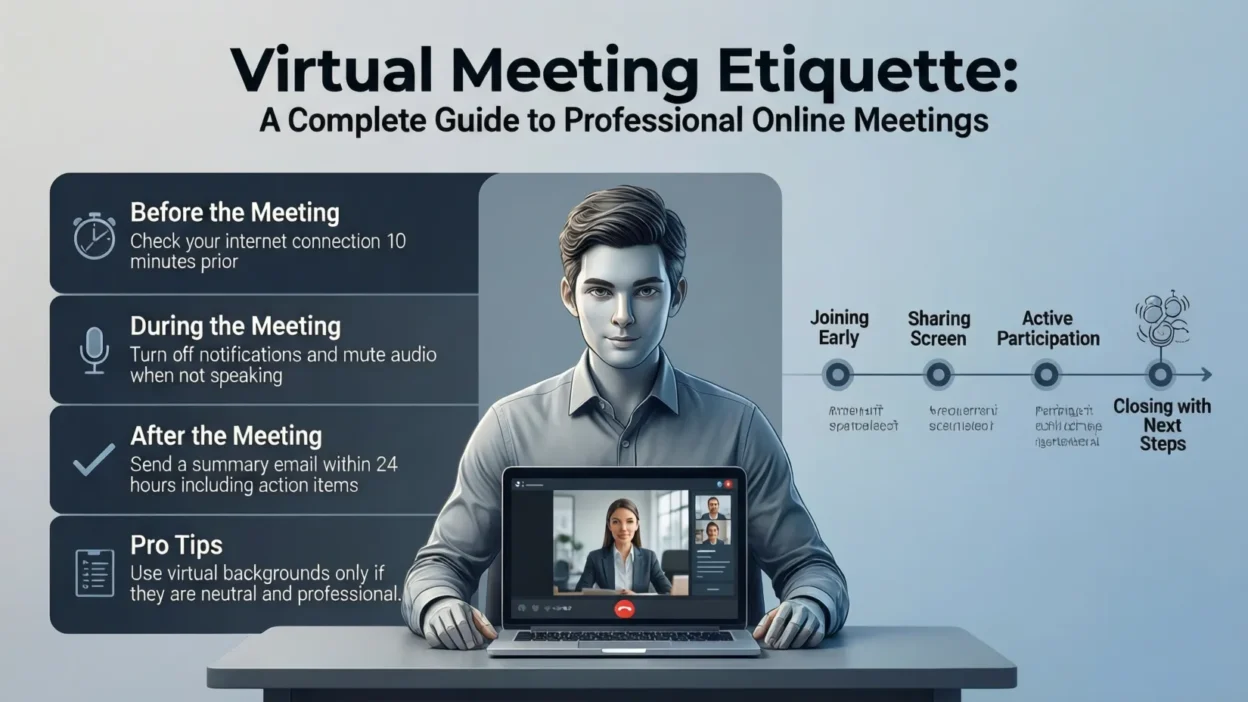
Start by testing your internet connection, microphone, and camera in advance. Technical issues can disrupt meetings and break the flow of discussion, so resolving them early is essential. Make sure your device is fully charged or connected to a power source, and close unnecessary applications to avoid distractions or performance issues.
Next, choose a quiet and professional environment. Select a clean background with good lighting, or use a neutral virtual background if needed. Dress appropriately, just as you would for an in-person meeting, especially for client calls or interviews. Finally, review the meeting agenda and any shared documents beforehand. Being familiar with the discussion topics allows you to participate confidently and contributes to a more productive and efficient virtual meeting.
Joining Virtual Meetings on Time and Being Ready
Punctuality is a key part of virtual meeting etiquette and shows respect for everyone’s schedule. Joining a virtual meeting on time helps set a professional tone and ensures discussions start smoothly. Logging in late can interrupt the flow of conversation and may cause you to miss important information or instructions.
To avoid delays, join the meeting a few minutes early. This gives you enough time to check your audio and video settings and resolve any last-minute technical issues. If a meeting requires a password or waiting room approval, arriving early helps prevent unnecessary disruptions. Being ready also means having the meeting link, agenda, and any required documents open and accessible.
In addition, prepare yourself mentally to participate. Close unrelated tabs, silence notifications, and focus fully on the meeting. If you must join late due to unavoidable circumstances, offer a brief apology in the chat rather than interrupting the speaker. Being punctual and prepared demonstrates professionalism and contributes to more organized and productive virtual meetings.
Proper Audio and Video Etiquette in Virtual Meetings
Maintaining proper audio and video etiquette is essential for clear communication in virtual meetings. Poor sound quality or distracting visuals can quickly reduce engagement and cause misunderstandings. One of the most important rules of virtual meeting etiquette is to keep your microphone muted when you are not speaking. This helps eliminate background noise and allows the speaker to be heard clearly.
When it’s your turn to speak, unmute yourself promptly and speak clearly at a moderate pace. Avoid talking over others, and wait for a pause before contributing to the discussion. Using headphones or a quality microphone can significantly improve audio clarity, especially in busy or shared environments.
Video etiquette is equally important. If your camera is on, position it at eye level and ensure your face is well-lit. Maintain a professional appearance and avoid unnecessary movement that may distract others. While some meetings allow cameras to be off, turning your camera on when appropriate helps build connection and engagement. Following proper audio and video etiquette creates a smoother, more professional virtual meeting experience for everyone involved.
Professional Communication Etiquette During Online Meetings
Effective and respectful communication is at the heart of virtual meeting etiquette. Since online meetings limit natural face-to-face interaction, it is important to be intentional about how you speak and listen. Always allow others to finish their thoughts before responding, and avoid interrupting, as delays and audio lag can easily cause people to talk over one another.
Use clear, concise language to express your ideas. Speaking briefly and staying on topic helps keep meetings focused and allows everyone a chance to participate. Pay attention to your tone of voice, as it can be easily misinterpreted in virtual settings. A calm, respectful tone encourages open discussion and collaboration.
Active listening is another key aspect of professional online communication. Show engagement by nodding, using appropriate reactions, or responding when prompted. Avoid side conversations, multitasking, or checking emails during the meeting, as this can appear disrespectful. By practicing thoughtful communication etiquette, you help create a positive, inclusive, and productive environment for all virtual meeting participants.
Chat, Reactions, and Screen-Sharing Etiquette
Chat features, reactions, and screen sharing can enhance virtual meetings when used appropriately, but misuse can also become distracting. Proper virtual meeting etiquette includes knowing when and how to use these tools professionally. The chat box should be used for relevant questions, quick clarifications, or sharing helpful links—avoid side conversations or off-topic messages during the meeting.
Reactions such as thumbs-up or clapping can be a polite way to show agreement or appreciation without interrupting the speaker. However, use them sparingly and only when appropriate for the meeting’s tone. Overusing emojis or informal reactions in professional meetings may reduce credibility, especially in client-facing or formal settings.
Screen sharing requires extra care. Before sharing your screen, close unnecessary tabs, mute notifications, and confirm that only relevant content is visible. Share the correct window instead of your entire screen whenever possible to maintain privacy. When finished, stop screen sharing promptly. Following proper chat, reaction, and screen-sharing etiquette helps keep virtual meetings organized, focused, and professional.
Body Language and Non-Verbal Etiquette on Video Calls
Even in virtual meetings, body language and non-verbal cues play a significant role in communication. Proper virtual meeting etiquette includes being mindful of how you appear on camera, as facial expressions, posture, and eye contact influence how your message is received. Sitting upright and facing the camera shows attentiveness and professionalism.
Maintain natural eye contact by occasionally looking into the camera rather than constantly watching your screen. This creates a sense of direct engagement with other participants. Be aware of your facial expressions, as they can unintentionally convey disinterest or frustration. A neutral or pleasant expression helps create a positive meeting atmosphere.
Avoid distracting movements such as fidgeting, excessive nodding, or looking away frequently. These actions can divert attention from the discussion. Small gestures like nodding at appropriate times or using subtle reactions can demonstrate active listening. By practicing good non-verbal etiquette, you enhance clarity, build trust, and communicate more effectively during video calls.
Managing Distractions and Multitasking
Managing distractions is a critical part of virtual meeting etiquette, especially in remote work environments. Home offices, mobile devices, and digital notifications can easily pull attention away from meetings. However, multitasking during virtual meetings often leads to missed information, reduced participation, and a lack of professionalism.
To stay focused, create a distraction-free workspace before the meeting begins. Silence phone notifications, close unrelated browser tabs, and inform others in your household that you should not be disturbed. Treat virtual meetings with the same level of seriousness as in-person meetings by giving them your full attention.
Multitasking, such as checking emails or working on other tasks during a meeting, can be noticeable through delayed responses or lack of engagement. This behavior may signal disinterest or disrespect to other participants. Staying present, listening actively, and contributing when appropriate helps meetings remain productive and collaborative. Effective distraction management demonstrates professionalism and ensures that virtual meetings achieve their intended goals.
Virtual Meeting Etiquette for Team Members
Virtual meeting etiquette for team members focuses on respectful participation and collaboration. Every participant plays a role in ensuring that online meetings are productive and professional. Team members should join meetings on time, follow the agenda, and come prepared to contribute when needed.
Active participation is important, but it should be balanced. Speak when you have something relevant to add, and avoid dominating the conversation. If you have questions or ideas, wait for an appropriate pause or use the raise-hand feature when available. Listening attentively to others shows respect and encourages open communication within the team.
Team members should also follow established meeting rules, such as muting microphones when not speaking and keeping cameras on if required. Supporting colleagues by acknowledging their input and staying engaged helps build a positive team culture. Practicing good virtual meeting etiquette as a team member strengthens collaboration, improves communication, and contributes to more effective remote meetings.
Virtual Meeting Etiquette for Hosts and Leaders
Virtual meeting etiquette is especially important for hosts and leaders, as they set the tone for the entire meeting. A well-organized and professionally led meeting encourages participation and keeps discussions focused. Hosts should begin by setting clear objectives, sharing the agenda in advance, and starting the meeting on time.
During the meeting, leaders should guide the conversation and ensure everyone has an opportunity to contribute. Managing speaking time, inviting quieter participants to share their thoughts, and keeping discussions on track are key responsibilities. Hosts should also establish basic meeting rules, such as muting microphones when not speaking and using chat or raise-hand features appropriately.
Handling technical issues calmly and efficiently is another important aspect of leadership etiquette. If problems arise, address them briefly without disrupting the meeting flow. Ending the meeting with a summary of key points and clear action items helps ensure alignment and accountability. Strong host etiquette leads to more productive, inclusive, and professional virtual meetings.
Cultural and Time-Zone Etiquette in Global Virtual Meetings
Cultural and time-zone awareness is an essential part of virtual meeting etiquette, especially for global and remote teams. When participants join from different regions, respecting cultural differences and scheduling constraints helps create an inclusive and professional meeting environment. Simple actions, such as greeting participants politely and being mindful of communication styles, can make a significant difference.
Scheduling meetings at reasonable times for all participants demonstrates respect for different time zones. When possible, rotate meeting times to ensure the same team members are not always inconvenienced. Sharing meeting agendas in advance also helps participants prepare, particularly when language barriers or cultural differences exist.
Clear and respectful communication is vital in global meetings. Avoid using slang, jargon, or culturally specific references that may confuse others. Speak clearly and allow extra time for responses when participants are communicating in a second language. By practicing cultural sensitivity and time-zone etiquette, teams can collaborate more effectively and build stronger international working relationships.
Common Virtual Meeting Etiquette Mistakes to Avoid
Even experienced professionals can make mistakes during virtual meetings, but being aware of common etiquette errors can help you avoid them. One frequent mistake is forgetting to mute the microphone when not speaking, which can introduce background noise and disrupt the meeting. Similarly, talking over others due to audio delays can make discussions confusing and unproductive.
Another common issue is poor camera etiquette. Sitting too far from the camera, having bad lighting, or appearing unprofessional can create a negative impression. Multitasking—such as checking emails or using your phone during meetings—is also easily noticeable and may signal a lack of respect for the discussion and other participants.
Joining meetings late without explanation, ignoring the agenda, or failing to participate are additional mistakes that reduce meeting effectiveness. Overusing chat features or reactions for non-essential comments can also become distracting. By recognizing and avoiding these common virtual meeting etiquette mistakes, you can contribute to smoother, more professional, and more productive online meetings.
Virtual Meeting Etiquette Tips for Different Platforms
While the core principles of virtual meeting etiquette remain the same, each platform has its own features and expectations. Understanding platform-specific etiquette helps meetings run more smoothly and prevents technical or communication issues. Popular platforms such as Zoom, Microsoft Teams, and Google Meet offer tools that, when used correctly, enhance professionalism and collaboration.
In Zoom meetings, use the mute button and raise-hand feature to manage speaking turns, and avoid entering meetings with your microphone unmuted. For Microsoft Teams, keep your status updated and use the chat and reactions professionally to support discussions without interrupting. In Google Meet, ensure your camera and microphone permissions are set correctly before joining to avoid delays.
Regardless of the platform, familiarize yourself with basic controls such as screen sharing, chat, and participant management. Knowing how to use these tools efficiently reflects preparedness and confidence. Adapting your behavior to each platform’s features ensures consistent professionalism across all virtual meeting environments.
Virtual Meeting Etiquette for Interviews and Client Calls
Virtual meetings for interviews and client calls require a higher level of professionalism, as first impressions play a critical role. Proper virtual meeting etiquette in these settings helps build trust, confidence, and credibility. Preparing in advance by testing your technology and choosing a quiet, professional environment is essential.
Dress professionally, even if the meeting is conducted from home. Maintain good posture, make eye contact with the camera, and keep your background clean and distraction-free. During interviews and client meetings, listen carefully, speak clearly, and avoid interrupting. Respond thoughtfully to questions and keep your answers concise and relevant.
Respecting time is also crucial. Join the meeting early, stay focused throughout, and avoid unnecessary distractions. After the meeting, a polite follow-up message or email can leave a positive lasting impression. Practicing strong virtual meeting etiquette during interviews and client calls demonstrates professionalism and helps establish strong professional relationships.
Best Practices for Ending Virtual Meetings Professionally
Ending a virtual meeting professionally is just as important as starting it well. Proper virtual meeting etiquette ensures that everyone leaves the meeting with clarity and alignment. As the meeting concludes, take a few minutes to summarize the key points discussed and confirm any decisions that were made.
Clearly outline next steps and assign action items, including responsibilities and deadlines. This helps prevent confusion and ensures accountability after the meeting ends. Allow participants a brief opportunity to ask final questions or share closing comments, keeping the discussion focused and time-efficient.
Before ending the meeting, thank participants for their time and contributions. A polite and positive sign-off reinforces professionalism and leaves a good impression. For larger or formal meetings, consider sharing meeting notes or a follow-up message afterward. Ending meetings in a structured and respectful way helps reinforce productive habits and improves the overall effectiveness of virtual meetings.
Conclusion
Virtual meeting etiquette has become an essential skill in today’s remote and hybrid work environments. From preparing in advance and joining meetings on time to communicating respectfully and managing distractions, following proper etiquette helps ensure smoother and more productive online meetings. Both participants and hosts play an important role in creating a professional and engaging virtual experience.
By applying these best practices, you can improve communication, build stronger professional relationships, and leave a positive impression in every virtual interaction. As digital collaboration continues to evolve, maintaining strong virtual meeting etiquette will remain key to workplace success. Consistency, awareness, and professionalism are the foundations of effective virtual meetings—master them, and your online meetings will become more focused, respectful, and impactful.