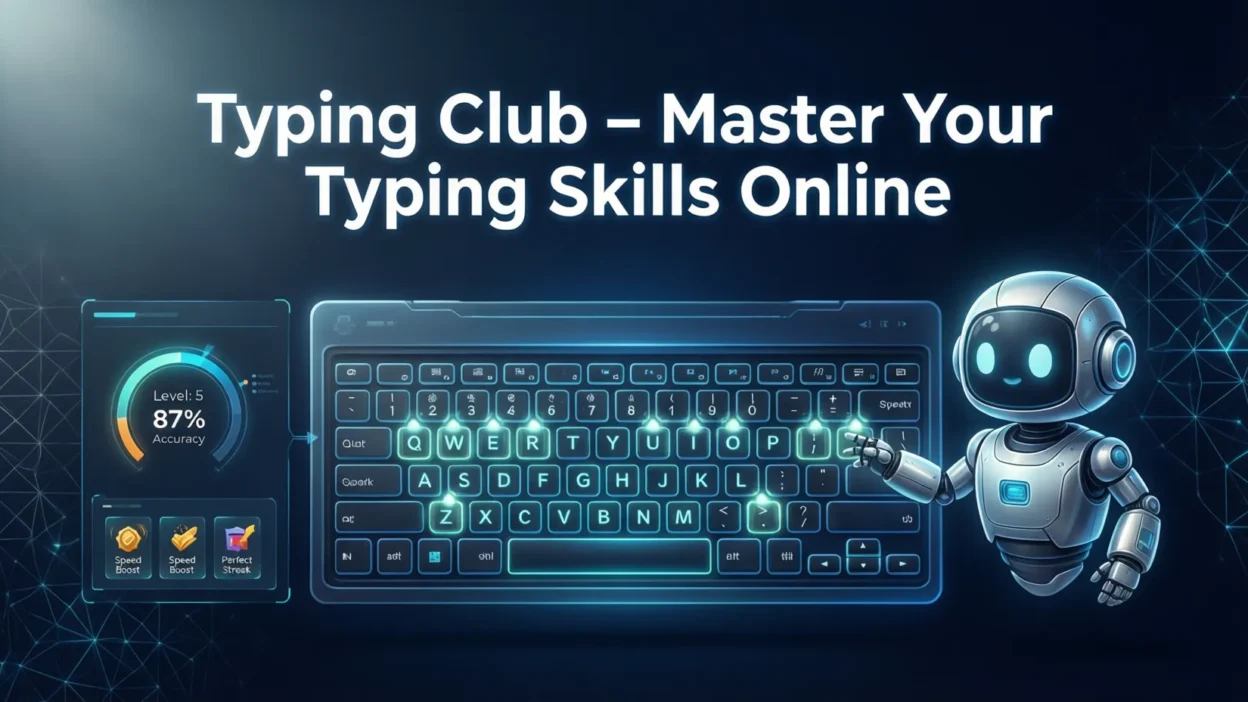
In today’s digital world, strong typing skills are more important than ever. Whether you’re a student aiming to complete assignments faster, a professional striving for workplace efficiency, or someone simply looking to improve your computer skills, Typing Club offers a fun and effective way to learn typing online. With interactive lessons, engaging games, and detailed progress tracking, Typing Club makes improving typing speed and accuracy easy and enjoyable.
The platform is suitable for beginners as well as advanced users, and it adapts to your learning pace to ensure consistent improvement. From daily practice exercises to competitive challenges, Typing Club provides everything you need to enhance your typing skills while staying motivated. In this article, we’ll explore the platform’s key features, benefits, pricing, tips, and how it can transform the way you type.
What is Typing Club?
Typing Club is a leading online platform designed to help users learn and improve typing skills efficiently. It provides a structured curriculum suitable for beginners, intermediate, and advanced typists, making it ideal for students, professionals, and anyone looking to enhance their keyboard skills. The platform is accessible on multiple devices, including desktop computers, laptops, and tablets, allowing users to practice anytime, anywhere.
Typing Club combines interactive lessons, gamified exercises, and progress tracking to make learning engaging and motivating. Users can start with basic finger placement exercises and gradually move to advanced typing drills, timed tests, and real-world typing scenarios. The platform also offers both free and premium plans, giving flexibility depending on your learning goals. With classroom integration features, teachers and parents can monitor progress, assign lessons, and help learners stay on track.
In short, Typing Club is more than just a typing tutor—it’s a complete online typing learning ecosystem.
Key Features of Typing Club
Typing Club stands out as one of the most popular typing platforms because of its rich set of features that make learning both effective and enjoyable. Here are the main features that users love:
- Interactive Lessons: Typing Club offers step-by-step lessons that adapt to your skill level, starting from beginner finger placement to advanced typing drills.
- Gamified Learning: Earn badges, points, and levels as you progress, keeping practice fun and motivating.
- Progress Tracking: Monitor your typing speed, accuracy, and improvement over time with detailed analytics and reports.
- Customizable Lessons: Tailor exercises to focus on weak keys or specific typing skills for faster improvement.
- Classroom Integration: Teachers can assign lessons, track student performance, and motivate learners through dashboards.
- Timed Tests & Challenges: Test your skills under time limits to improve speed and precision.
- Multi-Device Accessibility: Practice on computers, tablets, or laptops, anytime and anywhere.
These features make Typing Club a complete and engaging typing platform for all ages and skill levels.
How Typing Club Works
Getting started with Typing Club is simple and user-friendly. Here’s a step-by-step guide on how the platform works:
- Create an Account: Sign up for free using your email or Google account. You can also upgrade to premium later for additional features.
- Choose Your Level: Typing Club offers lessons for beginners, intermediate, and advanced users. Select the level that matches your current typing skills.
- Start Lessons: Begin with basic lessons to learn proper finger placement and gradually progress to more challenging exercises. Each lesson focuses on accuracy first, then speed.
- Track Your Progress: After each session, you’ll receive detailed stats on words per minute (WPM), accuracy, and lesson completion. This helps identify areas for improvement.
- Participate in Challenges: Engage in timed tests, competitions, and leaderboards to make learning fun and motivating.
- Use Custom Lessons: Focus on weak keys or specific typing patterns to improve faster.
By following these steps, Typing Club ensures a structured and effective learning experience that gradually improves your typing speed and accuracy.
Benefits of Using Typing Club
Using Typing Club comes with a wide range of benefits for learners of all ages and skill levels. Here’s why it’s worth incorporating into your daily routine:
- Improves Typing Speed: Regular practice on Typing Club helps increase words per minute (WPM), making typing faster and more efficient.
- Enhances Accuracy: Focused exercises reduce mistakes, allowing you to type confidently without errors.
- Builds Muscle Memory: Repetitive lessons train your fingers to hit the right keys instinctively, improving long-term typing efficiency.
- Boosts Productivity: Faster and accurate typing saves time for school assignments, office tasks, and online communication.
- Engaging Learning Experience: Gamified lessons, badges, and challenges keep motivation high and prevent boredom.
- Suitable for Everyone: Whether you’re a beginner, student, professional, or gamer, Typing Club adapts to your skill level.
- Supports Exam Preparation: Typing speed and accuracy gained from practice can help with competitive exams, coding tests, and online assessments.
- Accessible Anywhere: Learn on computers, laptops, or tablets, ensuring flexibility in your practice schedule.
With these advantages, Typing Club transforms the way you learn typing, turning a necessary skill into an enjoyable activity.
Typing Club for Students, Professionals, and Educators
Typing Club is designed to cater to different user groups, making it a versatile platform for learning and teaching typing skills.
For Students
- Helps improve typing speed for homework, assignments, and online tests.
- Develops proper finger placement and touch typing skills early on.
- Gamified lessons keep students engaged and motivated to practice regularly.
- Teachers can assign lessons and monitor progress to ensure consistent learning.
For Professionals
- Enhances workplace productivity by enabling faster email, report, and document typing.
- Improves accuracy, reducing errors in professional communication.
- Ideal for coding, data entry, or administrative tasks requiring efficient typing.
- Timed tests and challenges help maintain and improve speed over time.
For Educators and Parents
- Classroom integration allows teachers to track student performance.
- Parents can monitor progress at home and encourage daily practice.
- Customizable lessons make it easy to address individual learning needs.
- Motivational badges and rewards create a positive learning experience.
By serving students, professionals, and educators alike, Typing Club ensures that everyone can achieve faster, more accurate typing skills efficiently.
Typing Club Lessons and Curriculum
Typing Club offers a well-structured curriculum designed to take learners from beginners to advanced typists. The lessons are organized to gradually improve typing speed, accuracy, and efficiency.
- Beginner Lessons: Focus on finger placement, home row keys, and basic typing techniques. These lessons help learners build a strong foundation.
- Intermediate Lessons: Introduce more complex key combinations, punctuation, and numbers. These exercises aim to increase speed while maintaining accuracy.
- Advanced Lessons: Include timed tests, advanced drills, and real-world typing scenarios to refine both speed and precision.
- Skill Progression: Lessons are adaptive, meaning they adjust to your performance. If a learner struggles with certain keys, the platform provides extra practice on those areas.
- Custom Lessons: Users can create lessons to focus on weak areas or specific typing patterns for targeted improvement.
- Gamified Challenges: Lessons are paired with games, badges, and achievements to keep learners motivated and engaged.
This structured curriculum ensures that whether you’re starting fresh or aiming to reach expert-level typing, Typing Club provides a clear and effective learning path.
Typing Club Games and Engagement
One of the standout features of Typing Club is its gamified approach to learning, which makes improving typing skills both fun and motivating.
- Interactive Typing Games: Typing Club includes a variety of games that challenge your speed and accuracy while keeping lessons entertaining.
- Badges and Achievements: Earn rewards for completing lessons, reaching speed milestones, and maintaining accuracy streaks.
- Leaderboards and Competitions: Compete with other learners worldwide to boost motivation and track performance.
- Challenges and Timed Tests: Participate in fun challenges that test your typing under pressure, improving real-world typing efficiency.
- Engagement for All Ages: Games and interactive lessons are designed to appeal to students, professionals, and even casual learners, making the platform enjoyable for everyone.
By combining learning with play, Typing Club ensures that learners remain engaged, motivated, and consistent in their typing practice, turning what could be a monotonous activity into an exciting experience.
Typing Club Pricing and Plans
Typing Club offers flexible plans to suit different users, from casual learners to schools and professionals:
- Free Plan:
- Access to basic lessons and exercises.
- Includes progress tracking and gamified features.
- Ideal for beginners and casual learners who want to improve typing without any cost.
- Premium Plan:
- Unlocks advanced lessons, additional games, and detailed performance analytics.
- Offers priority support and ad-free learning experience.
- Suitable for serious learners, professionals, and schools looking for structured training.
- School & Classroom Plans:
- Designed for teachers and educational institutions.
- Enables classroom integration, lesson assignments, and student progress monitoring.
- Cost-effective solution for group learning and educational programs.
With these options, Typing Club ensures that everyone can access quality typing lessons, whether for free, through a premium subscription, or via educational packages for students and teachers.
Tips to Maximize Learning on Typing Club
To get the most out of Typing Club and improve your typing speed and accuracy quickly, follow these practical tips:
- Practice Daily: Consistency is key. Even 15–20 minutes a day can lead to noticeable improvement.
- Focus on Accuracy First: Speed will naturally improve as your accuracy increases, so prioritize hitting the correct keys.
- Use Custom Lessons: Target weak keys or tricky combinations with tailored exercises to strengthen problem areas.
- Participate in Challenges: Engage in timed tests and competitions to make learning more exciting and measure progress.
- Track Your Progress: Regularly review performance reports to identify areas that need improvement.
- Set Realistic Goals: Aim for small, achievable milestones like increasing WPM by 5–10 words per week.
- Stay Motivated with Gamification: Collect badges, achievements, and rewards to maintain enthusiasm.
- Practice on Multiple Devices: Switching between computers, laptops, or tablets can improve adaptability and comfort.
By applying these strategies, you can accelerate your typing skills and make learning enjoyable on Typing Club.
Common Problems and How to Fix Them
While Typing Club is user-friendly, learners may sometimes encounter minor issues. Here’s how to handle them:
- Login Issues:
- Ensure your email and password are correct.
- Clear browser cache or try a different browser if problems persist.
- Browser or Device Compatibility:
- Typing Club works best on updated versions of Chrome, Firefox, or Edge.
- Mobile and tablet users should use the app for a smoother experience.
- Lesson Progress Not Saving:
- Check your internet connection.
- Ensure you are logged into the correct account.
- If the issue continues, contact Typing Club support.
- Game or Feature Not Loading:
- Refresh the page or restart the device.
- Update your browser or app to the latest version.
- Difficulty in Typing Certain Keys:
- Use custom lessons to focus on challenging keys.
- Slow down initially and practice accuracy before increasing speed.
By following these solutions, you can overcome common issues and continue learning effectively on Typing Club without interruptions.
Typing Club Alternatives
While Typing Club is a top choice for learning typing online, there are other platforms that learners might consider:
- Typing.com:
- Free and premium options.
- Offers lessons, games, and typing tests.
- Suitable for beginners and schools.
- Keybr:
- Focuses on generating random text to improve typing patterns.
- Minimalist interface, great for practicing accuracy.
- Nitrotype:
- Combines typing with competitive racing games.
- Fun and interactive, especially popular among younger learners.
- Ratatype:
- Provides typing courses with certification upon completion.
- Includes group lessons for schools and teams.
Why Typing Club Stands Out:
- Gamified lessons with badges and achievements.
- Detailed progress tracking and analytics.
- Classroom integration for teachers and parents.
- Adaptive lessons tailored to individual skill levels.
Although alternatives exist, Typing Club offers a complete, engaging, and structured approach, making it ideal for learners of all ages and skill levels.
Success Stories and Testimonials
Many users have transformed their typing skills using Typing Club, achieving faster, more accurate typing while enjoying the learning process.
- Students: Sarah, a high school student, increased her typing speed from 25 WPM to 70 WPM in just three months, helping her complete assignments faster and perform better in online exams.
- Professionals: John, an office worker, improved his email and report writing efficiency, saving hours of work each week and impressing his manager with his accuracy.
- Teachers: Mrs. Williams, a middle school teacher, used Typing Club’s classroom integration to monitor her students’ progress. She noticed significant improvement in students’ typing accuracy and engagement within a semester.
- Gamers and Enthusiasts: Alex, a competitive gamer, used Typing Club games to improve reaction time and key precision, enhancing his gaming performance.
These success stories demonstrate that Typing Club is effective for learners of all ages, turning typing into a skill that can boost productivity, learning, and even fun.
Conclusion
Typing Club is more than just an online typing platform—it’s a complete learning ecosystem that helps students, professionals, and enthusiasts improve their typing speed, accuracy, and overall efficiency. With its interactive lessons, gamified exercises, progress tracking, and customizable curriculum, Typing Club makes learning to type engaging and effective. Whether you’re a beginner aiming to master the basics or an advanced user striving to reach expert-level typing, the platform adapts to your skill level and keeps you motivated.
By practicing regularly, focusing on accuracy, and utilizing features like challenges, custom lessons, and classroom tools, you can achieve noticeable improvements in a short time. Typing Club also stands out with its accessibility across devices and support for educators, making it ideal for both personal and academic use.
Start your typing journey today with Typing Club and unlock the full potential of your keyboard skills!